|
Free download Take Command 13.04

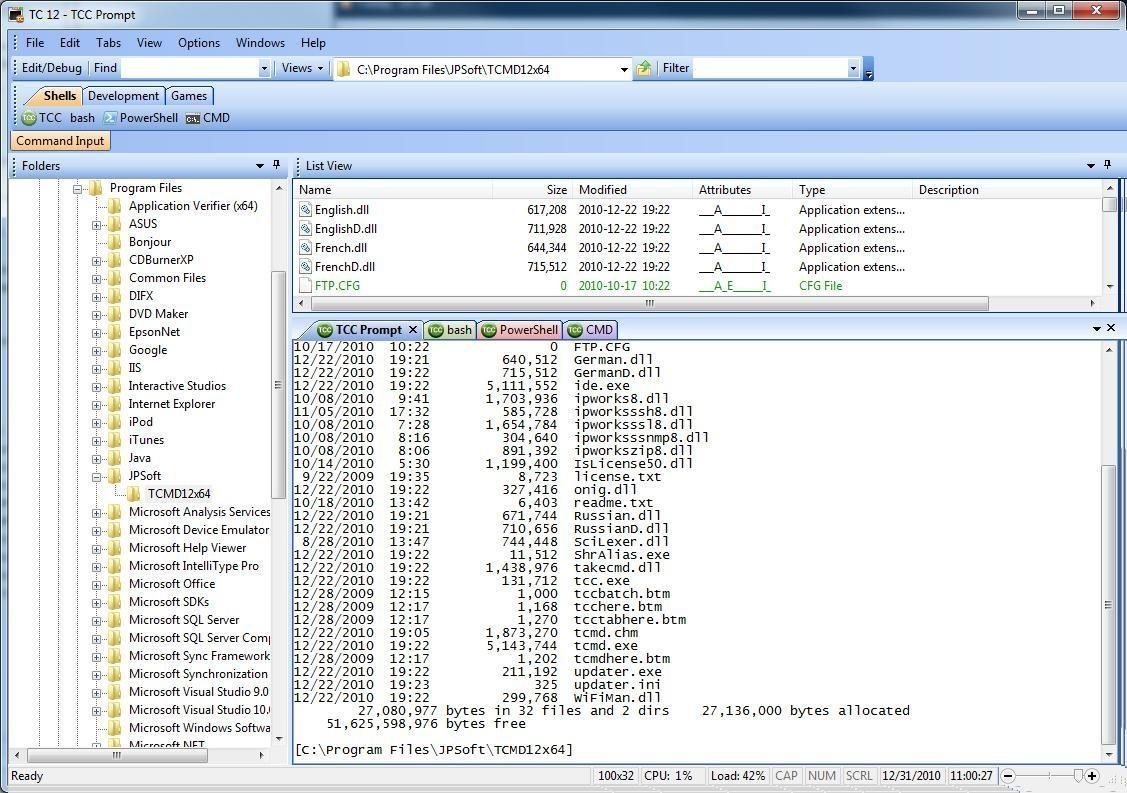
 Take Command offers a new approach to working in Windows, bringing users the power of the command line and the ease of use of the Windows interface. Take Command supports existing CMD.EXE commands and batch files, and adds thousands of new features, giving you more power and flexibility than you ever imagined. And CMD and PowerShell users will love Take Command's tabbed console windows and Windows shell integration. Take Command adds features such as extensive context-sensitive online help, shell monitoring commands, plugins, aliases for commonly used commands, a powerful command line editor, history recall, filename completion (even across a network), popup command and directory history windows, and extended directory searches that can take you to any directory on your system by entering only part of its name. Take Command expands the Windows file handling commands, giving you the ability to copy, move, delete, or list multiple files with a single command, and adding FTP and HTTP support (including SSL and SSH) . You can select or exclude files from any command by their date, time, size, and extended wildcards for extraordinary flexibility. Batch file users will be amazed at the power and speed Take Command adds to Windows batch files, with an array of new batch commands and a powerful batch debugger with single stepping, breakpoints, syntax coloring, popup variable windows, and editing. The extended batch language in Take Command includes subroutines, DO statements, IF THEN ELSE statements, SWITCH statements, error handling, more than 170 internal commands and 440 internal variables. And if you don't like the default behavior, Take Command allows you to adjust its configuration either through interactive dialogs or on the command line. Take Command offers a new approach to working in Windows, bringing users the power of the command line and the ease of use of the Windows interface. Take Command supports existing CMD.EXE commands and batch files, and adds thousands of new features, giving you more power and flexibility than you ever imagined. And CMD and PowerShell users will love Take Command's tabbed console windows and Windows shell integration. Take Command adds features such as extensive context-sensitive online help, shell monitoring commands, plugins, aliases for commonly used commands, a powerful command line editor, history recall, filename completion (even across a network), popup command and directory history windows, and extended directory searches that can take you to any directory on your system by entering only part of its name. Take Command expands the Windows file handling commands, giving you the ability to copy, move, delete, or list multiple files with a single command, and adding FTP and HTTP support (including SSL and SSH) . You can select or exclude files from any command by their date, time, size, and extended wildcards for extraordinary flexibility. Batch file users will be amazed at the power and speed Take Command adds to Windows batch files, with an array of new batch commands and a powerful batch debugger with single stepping, breakpoints, syntax coloring, popup variable windows, and editing. The extended batch language in Take Command includes subroutines, DO statements, IF THEN ELSE statements, SWITCH statements, error handling, more than 170 internal commands and 440 internal variables. And if you don't like the default behavior, Take Command allows you to adjust its configuration either through interactive dialogs or on the command line.
Take Command 13.04 system utilities, shell tools software developed by JP Software. The license of this system utilities, shell tools software is shareware, the price is 99.95, you can free download and get a free trial before you buy a license or registration. All Take Command 13.04 download links are direct Take Command full download from JP Software site or their selected mirrors.
Keywords: Take Command, Command Shell, Batch, Scripts, Command line, Command Prompt, CMD, Batch Programming, Batch Language, Tabbed Console, TCC, CMD, PowerShell, 4NT, Command interpreter, Shareware, System Utilities, Shell Tools, JP Software, Take Command
Recent Changes: Over 400 new features since v12, including a new text and binary file viewer and command dialogs.
Install Support: Install and Uninstall
Supported Languages: English, French, German, Italian, Russian, Spanish
Additional Requirements: 20MB free disk space
|




 (total votes: 0)


 TradeTrakker 2.93: Powerful investment tracking program to automatically track stocks/mutual funds
 Advanced XLS Converter 2.55: With XLS Converter you can convert Excel (XLS) files into dozens of formats!
 Domain Quester Pro 6.02: Search for domains by unlimited number of keywords
 Audio DVD Maker 1.0: Audio DVD Maker is an innovative utility for you to personalize your own DVD