|
Free download PhotoLab Calendar for Workgroup 3.2
 
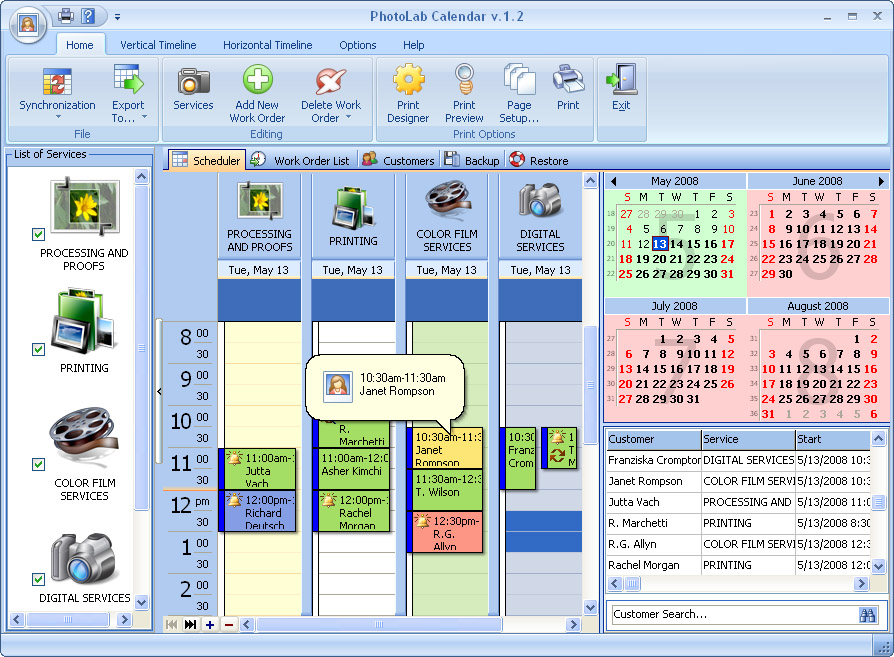
  This is a more powerful version of PhotoLab Calendar, with all of the features of the standard version, but with the additional capability to share data in real time over the network. PhotoLab Calendar is a must-have schedule management tool for anyone who has a photo or video business. It supports infinite number of resources (digital services, film services) and has a well-organized navigation system. It's perfect to plan working hours, keep track of scheduled appointments and orders. It'll store the information about clients, such as their address, telephone, email and comments. There are two viewing modes in the program: calendar with a vertical and horizontal timeline and a table view to help you get the general overview of the jobs. It's possible to create reminders to alert users about the things they should do. Available is an automatic search and auto-field filling for a client, who has already been entered to the database. You can view the information about payments, daily income for any day at any moment when you need it. Exchanging data with other applications (Apple iCal, Microsoft Exchange Server, Novell GroupWise) is made easier with the new support for the iCal data format. For those people, who work in Microsoft Outlook, it's possible to synch data. Export of data is available to different formats: XLS, PDF, TXT, HTML, XML for its adaptation for other programs. In case of crashes or virus attacks, there is an auto backup function with a possibility to remove old archives automatically. You pay for the program only the first time and get all new versions of this program for FREE and for a lifetime! This is a more powerful version of PhotoLab Calendar, with all of the features of the standard version, but with the additional capability to share data in real time over the network. PhotoLab Calendar is a must-have schedule management tool for anyone who has a photo or video business. It supports infinite number of resources (digital services, film services) and has a well-organized navigation system. It's perfect to plan working hours, keep track of scheduled appointments and orders. It'll store the information about clients, such as their address, telephone, email and comments. There are two viewing modes in the program: calendar with a vertical and horizontal timeline and a table view to help you get the general overview of the jobs. It's possible to create reminders to alert users about the things they should do. Available is an automatic search and auto-field filling for a client, who has already been entered to the database. You can view the information about payments, daily income for any day at any moment when you need it. Exchanging data with other applications (Apple iCal, Microsoft Exchange Server, Novell GroupWise) is made easier with the new support for the iCal data format. For those people, who work in Microsoft Outlook, it's possible to synch data. Export of data is available to different formats: XLS, PDF, TXT, HTML, XML for its adaptation for other programs. In case of crashes or virus attacks, there is an auto backup function with a possibility to remove old archives automatically. You pay for the program only the first time and get all new versions of this program for FREE and for a lifetime!
PhotoLab Calendar for Workgroup 3.2 business, vertical market apps software developed by OrgBusiness Software. The license of this business, vertical market apps software is shareware, the price is 69.95, you can free download and get a free trial before you buy a license or registration. All PhotoLab Calendar for Workgroup 3.2 download links are direct PhotoLab Calendar for Workgroup full download from OrgBusiness Software site or their selected mirrors.
Keywords: studio planning, studio scheduling, studio booking software, studio software, studio organizer, calendar, scheduler, scheduling, organizer, planner, management software, pim, point-of-sale software, Shareware, Business, Vertical Market Apps, OrgBusiness Software, PhotoLab Calendar for Workgroup
Recent Changes: We have added the iCalendar Import and iCalendar Export options to import/export iCal (VCalendar 2.0) data to/from a scheduler.
Install Support: Install and Uninstall
Supported Languages: English
Additional Requirements: 32 MB of RAM, 7 MB of available hard disk space.
|




 (total votes: 0)


 Domain Quester 6.02: Search for domains by unlimited number of keywords
 Advanced XLS Converter 2.55: With XLS Converter you can convert Excel (XLS) files into dozens of formats!
 Audio DVD Maker 1.0: Audio DVD Maker is an innovative utility for you to personalize your own DVD